
Facebook & Instagram Profile Viewer
How It Works
Use Profileri’s Facebook Profile Viewer to explore available information from a public Facebook profile using a username or profile URL. The result opens with an organized profile card containing the user’s display picture, cover photo, name, username, intro, profile links, and other available details, followed by recent public posts, photos, reels, and supported media. Eligible media can be previewed individually, with download options shown on accessible media.
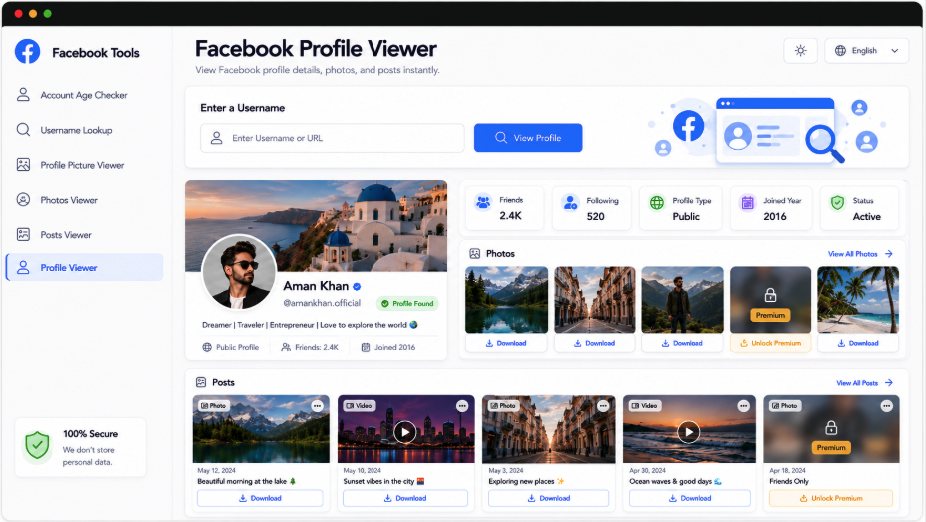
Explore Facebook Profiles in One Viewer
Profileri brings available Facebook profile information and recent media together instead of requiring you to move between separate profile sections. Enter a username or public profile link to confirm the correct account through its display picture, cover image, username, intro, and other visible details. The viewer then organizes supported posts, photos, and media previews into dedicated sections, with individual download options.
Complete Facebook Profile Card
Recent Posts, Photos and Reels
Display Picture & Cover Photo
Preview & Download Media
Profile Overview
DP, Cover & Details
Recent Content
Posts, Photos & Reels
Media Access
Preview & Download
Explore More Facebook Profile Tools
Continue exploring Facebook information with Profileri’s dedicated tools for profile images, cover photos, posts, photo collections, and reels. Each viewer focuses on one type of public content while keeping the same clean lookup experience. You can move from the complete Facebook Profile Viewer into a more focused media tool whenever you only need the profile picture, banner, recent posts, or photo results.
Facebook Profile Picture Viewer
View the available Facebook display picture in larger quality, and download supported profile-image versions.
View DPFacebook Cover Photo Viewer
Preview the available Facebook cover image, inspect the full banner without profile-page cropping, and download.
View CoverFacebook Posts Viewer
Browse available Facebook posts with captions, publishing data, photos, videos, media previews, and download options.
ViewFacebook Photos Viewer
Explore available Facebook photo results, open previews through supported image collections, and download photos.
ViewFacebook Reels Viewer
View available Facebook reels with video previews, publishing details, profile confirmation, and download.
ViewFacebook Account Age Checker
Review the available Facebook creation-year timeline, completed account age, and approximate elapsed days.
CheckConfirm Facebook Profile Before Browsing
Every successful lookup begins with the available Facebook profile identity so you can verify that the posts and media belong to the intended account. Depending on what is publicly accessible, Profileri may display the current profile picture, cover photo, full name, username, intro or headline, public profile URL, join or timeline information, visible friends information, and other supported profile details.
Available photo and video results
Full previews for profile & supported media
Media research workflow
Profileri Premium Access
Extended Profile Lookups
100%
Expanded Available Media Results
90%
Faster Content Research
80%
Features of Facebook Profile Viewer:
The Facebook Profile Viewer helps users explore publicly available information from a Facebook profile through one organized results page. By entering a username or profile URL, the tool identifies the matching account and displays available details such as the profile picture, cover photo, name, username, intro, profile links, and other visible information. It can also organize recent public posts, photos, reels, and supported media for easier browsing. Eligible media may be opened individually, with download options shown when available. This provides a convenient way to review public Facebook profile content without manually moving through multiple profile sections and media pages.
Public Profile Overview
Displays available profile details, including names, photos, usernames, intro information, and useful profile links directly.
Organized Content Browsing
Organizes recent public posts, photos, reels, and supported media into one convenient viewing experience online.
Individual Media Preview
Allows eligible photos, reels, and other supported media to open individually for clearer content viewing.
Supported Media Downloads
Shows available download options for supported public media when accessible through the selected Facebook profile.
How the Facebook Profile Viewer Works
The Facebook Profile Viewer works by using the Facebook username or public profile URL entered by the user to locate the corresponding accessible account. After identifying the profile, the tool creates an organized profile card containing available information such as the display picture, cover photo, name, username, intro, profile links, and other visible details. It then gathers supported public content, which may include recent posts, photos, reels, and media previews. Users can browse these results from one page, open eligible media individually, and use available download options when supported. The tool only presents information that can be accessed publicly online.
Enter Facebook Profile: Enter a Facebook username or public profile URL into the search field to begin viewing.
Confirm Profile Details: Review the displayed profile card to confirm the correct Facebook account has been identified successfully.
Browse Public Content: Explore available posts, photos, reels, media previews, and supported download options from organized results online.
Frequently Asked Questions
To use the Facebook Profile Viewer, enter a Facebook username or paste the public profile URL into the search field. Start the lookup and review the profile card to confirm that the correct account has been identified. When available, the tool then organizes public posts, photos, reels, profile details, and supported media into one results page. You can browse the displayed content, open eligible media individually, and use any download options provided for accessible media files when those options appear.
The viewer is designed to display information and content that is publicly accessible from the selected Facebook profile. This may include the profile picture, cover photo, name, username, intro, profile links, recent public posts, photos, reels, and supported media. It does not provide access to private posts, restricted photos, hidden profile sections, or other content that Facebook does not make publicly available. Results can vary depending on the account's privacy settings and current platform availability during each individual profile lookup.
You generally do not need to interact directly with the Facebook profile when using the viewer to review publicly available information. However, the tool should not be treated as a guarantee of complete anonymity, because websites and online services may maintain their own technical logs or analytics. The viewer focuses on organizing publicly accessible profile details and media. It does not unlock private content, bypass Facebook privacy settings, or provide access to restricted information from an account during the lookup.